# gpuix-svelte

Write desktop apps in Svelte and render them straight into a native, GPU-accelerated window.
gpuix-svelte is a Svelte custom renderer for [GPUI](https://www.gpui.rs/), the UI framework behind
the Zed editor. It talks to GPUI through [`@gpuix/native`](https://www.npmjs.com/package/@gpuix/native).
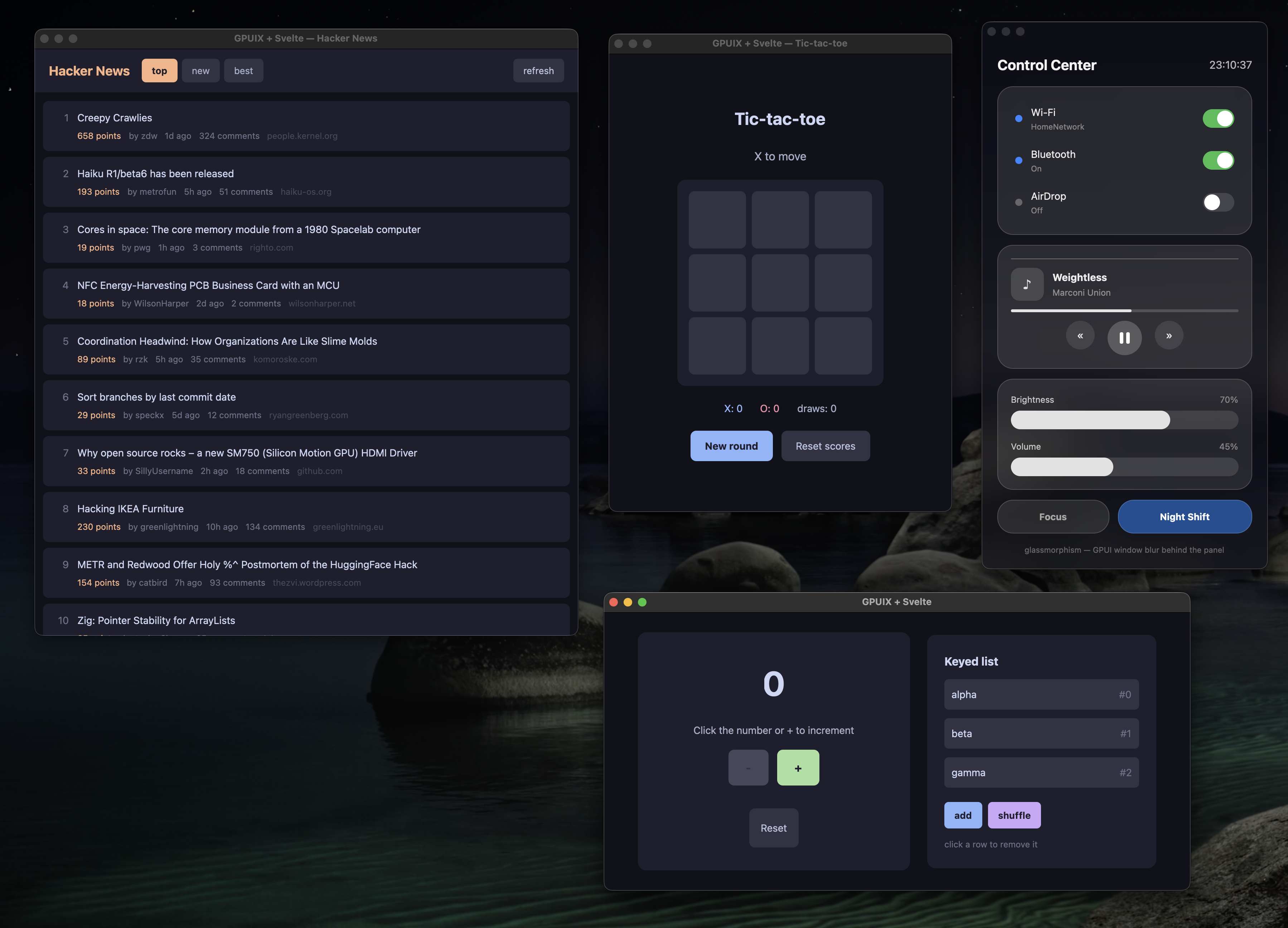
![Four gpuix-svelte demos running as native macOS windows](https://raw.githubusercontent.com/khromov/gpuix-svelte/main/.github/resources/demos.png)

> [!WARNING]
> **Experimental.** gpuix-svelte is built on Svelte's unreleased
> [custom renderer API](https://github.com/sveltejs/svelte/pull/18511), so every release ships the
> exact Svelte build it was tested against (see [About the Svelte
> version](#about-the-svelte-version)). Expect breaking changes between minor versions.

## Quick start

```bash
npm create gpuix-svelte@latest my-app
cd my-app
npm install
npm start
```

A counter opens in its own window. Edit `App.svelte`, save, and the window hot-reloads.

You need **Node.js 24 or later** or **Bun 1.4 or later**, on macOS (Apple Silicon), Windows (x64)
or Linux (x64). The GPUI binary comes prebuilt from npm, so `npm install` is all the setup there
is. On Bun, run `bun create gpuix-svelte my-app`, then `cd my-app`, `bun install` and
`bun run start`. Building a standalone executable (`npm run build`) needs [Bun](https://bun.com)
whichever runtime you develop on.

## What it looks like

```svelte
<!-- App.svelte -->
<script lang="ts">
  let count = $state(0);
</script>

<div class="app">
  <text class="count">{count}</text>
  <div class="btn" onclick={() => count++}>Add one</div>
</div>

<style>
  .app { display: flex; flex-direction: column; align-items: center; gap: 16px; padding: 32px;
         width: 100%; height: 100%; background-color: #1e1e2e; }
  .count { font-size: 48px; color: #cdd6f4; }
  .btn { padding: 12px 24px; border-radius: 8px; background-color: #313244; color: #cdd6f4; }
  .btn:hover { background-color: #45475a; }
</style>
```

```ts
// app.ts
import { render_hot } from 'gpuix-svelte';

render_hot(new URL('./App.svelte', import.meta.url), { title: 'My app', width: 640, height: 480 });
```

```bash
npx gpuix-svelte app.ts          # Node
npx gpuix-svelte --bun app.ts    # Bun
```

Runes, snippets, `{#each}`, `{#if}`, `{#await}`, `<svelte:boundary>` and `.svelte.ts` state modules
all work as you'd expect. Scoped `<style>` blocks work too, for class rules (the
[styling page](https://khromov.github.io/gpuix-svelte/styling.md) has the details). Underneath, GPUI's element tree is painted on
the GPU, and your UI shares its process with the whole of Node or Bun: files, processes, SQLite
and native addons.

## Coming from Svelte on the web

- **Elements are GPUI's**: `div`, `text`, `img`, `svg`, `input`, `textarea`, `code`, `markdown`,
  `virtual-list`, `anchored` and a few more. Any other tag renders as a `div`, with a one-time
  warning. `<img src>` takes a file path, a `data:` URL or an http(s) URL.
- **Styling is CSS text for a flexbox layout in logical pixels.** Lengths are `px` or `rem`
  (16 px), and sizes (`width`, `height`, `min-*`, `max-*`) also take `%` and `auto`. `<style>`
  blocks take class rules with `:hover` and `:active`. Values GPUI can't use are dropped with a
  warning. → [docs/styling.md](https://khromov.github.io/gpuix-svelte/styling.md)
- **Theming** is `var(--token)` in your styles plus one `set_css_vars({ token: '#fff' })` call.
  → [docs/styling.md#theming-with-css-variables](https://khromov.github.io/gpuix-svelte/styling.md#theming-with-css-variables)
- **Mouse events go to the element under the pointer.** Put `hitbox="self"` on a clickable
  element and clicks on its decoration reach it. `onclick` is the primary button; right and middle
  clicks are `onauxclick`. → [docs/styling.md](https://khromov.github.io/gpuix-svelte/styling.md) (non-standard semantics)
- **Inputs report through events**, with the value in the payload:
  `<input value={text} onchange={(e) => (text = e.value)} />`. The compiler refuses `bind:` under
  a custom renderer, and `{@attach}` hands you the element. → [docs/guide.md](https://khromov.github.io/gpuix-svelte/guide.md)
- **Keyboard shortcuts** go through `on_window_key('keydown', handler)`, which hears every key
  whatever has focus. → [docs/guide.md](https://khromov.github.io/gpuix-svelte/guide.md#keyboard-shortcuts-and-focus)
- **`Scroller`, `Portal`, `Tooltip` and `Popover` ship with the package**: a scroll column with a
  drawn scrollbar (virtualised on request), a wrapper that paints modals, menus and toasts on top
  from anywhere in the tree, and a hover tip and a controlled panel that hang beside their
  trigger. → [docs/components.md](https://khromov.github.io/gpuix-svelte/components.md)
- **Window and desktop APIs** cover the title, fullscreen, the file picker, file drops, images
  from raw pixels, focus and accessibility attributes.
  → [docs/guide.md](https://khromov.github.io/gpuix-svelte/guide.md#window-and-desktop-helpers)

## Documentation

| | |
|---|---|
| [Styling](https://khromov.github.io/gpuix-svelte/styling.md) | Every CSS property and value GPUI understands, what is dropped, theming with variables |
| [Components](https://khromov.github.io/gpuix-svelte/components.md) | `Scroller` (incl. virtualised lists), `Portal`, `Tooltip`, `Popover`, and the native `<anchored>` they build on |
| [Guide](https://khromov.github.io/gpuix-svelte/guide.md) | Forms, text search, keyboard and focus, reactive window size, window and desktop helpers, state that survives hot reload |
| [Testing](https://khromov.github.io/gpuix-svelte/testing.md) | Headless tests that click through GPUI's real hit testing, screenshots, and driving a running window |
| [Shipping](https://khromov.github.io/gpuix-svelte/shipping.md) | Standalone binaries, signed macOS apps, and running in a browser via WebGPU |

For real code, the [examples](https://github.com/khromov/gpuix-svelte/blob/main/examples) are the best reference (see [Examples](#examples)).

## Adding it to an existing project

```bash
npm install gpuix-svelte
```

`gpuix-svelte` brings its own Svelte, so it's the only runtime dependency you add (see [About the
Svelte version](#about-the-svelte-version)). Run your entry through the package's bin, usually from
`package.json`:

```json
{
  "type": "module",
  "scripts": {
    "start": "gpuix-svelte app.ts",
    "test": "gpuix-svelte test.ts"
  }
}
```

The bin starts Node, or Bun when you pass `--bun` or launch it with `bun run`. Before your entry
loads, it sets the `custom-renderer` module condition, which selects Svelte's client build with the
renderer API, and installs the `.svelte` loader. Your `.ts` files need no loader: Node and Bun
strip the types themselves, and the package ships as plain JavaScript.

Runtime flags go before the entry, and a flag that takes a value needs the `=` form
(`gpuix-svelte --experimental-ffi app.ts`, `gpuix-svelte --import=tsx app.ts`). Arguments after
the entry go to your script. Spelled out, the bin runs:

```bash
node --conditions custom-renderer --conditions development --import gpuix-svelte/register app.ts
bun  --conditions custom-renderer --conditions development --preload gpuix-svelte/plugin app.ts
```

On Bun, `preload = ["gpuix-svelte/plugin"]` in a `bunfig.toml` does the job of `--preload` for
ad-hoc `bun file.ts` runs.

### TypeScript

The package ships type declarations. Your `tsconfig.json` needs a `paths` entry that points at the
Svelte build nested inside the package. For the editor and `svelte-check` to type your markup as
GPUI elements, it also needs the `gpuixHTML` namespace:

```jsonc
{
  "compilerOptions": {
    "module": "nodenext",
    "strict": true,
    "noEmit": true,
    "allowImportingTsExtensions": true,
    "erasableSyntaxOnly": true,
    "verbatimModuleSyntax": true,
    "customConditions": ["custom-renderer", "development"],
    "types": ["node", "gpuix-svelte/html"],
    "skipLibCheck": true,
    "paths": {
      "svelte": ["./node_modules/gpuix-svelte/node_modules/svelte"],
      "svelte/*": ["./node_modules/gpuix-svelte/node_modules/svelte/*"]
    }
  },
  "svelteOptions": { "namespace": "gpuixHTML" }
}
```

You'll also want a `*.svelte` module declaration and a `svelte.config.js` that turns off Svelte's
DOM accessibility advice. [`starter/`](https://github.com/khromov/gpuix-svelte/blob/main/starter) has all three, ready to copy.

With this config, `tsc` rejects what Node's built-in type stripping can't run.
`erasableSyntaxOnly` catches enums, namespaces and parameter properties, `verbatimModuleSyntax`
catches a type imported without `import type`, and `module: nodenext` requires a file extension
on relative imports, which `allowImportingTsExtensions` lets you spell `.ts`. If your app needs
that syntax anyway, install tsx and load it through the bin: `gpuix-svelte --import=tsx app.ts`.

Event handlers take a `GpuixEvent` and `{@attach}` gets a `ShadowNode`. Both are exported as types:

```svelte
<script lang="ts">
  import type { GpuixEvent, ShadowNode } from 'gpuix-svelte';
</script>
```

## Examples

Clone the repository to run them (`bun install`, then the command):

| | |
|---|---|
| `npm run demo:counter` | The counter, hot-reloading on save |
| `npm run demo:tictactoe` | Tic-tac-toe with score tracking |
| `npm run demo:hn` | Hacker News reader: live network data in a scrolling list |
| `npm run demo:glass` | A translucent control center over macOS vibrancy (`demo:glass-ffi`: real Liquid Glass via FFI, macOS 26+) |
| `npm run demo:styling` | Which CSS reaches GPUI and which is dropped, side by side |
| `npm run demo:desktop` | Window controls, file picker and drops, live image pixels, selection, focus, accessibility |
| `npm run demo:web` | Tic-tac-toe in a browser on GPUI's WebAssembly build (Bun) |
| `npm run tutorial` | A 12-step interactive guide to the renderer, itself a gpuix-svelte app |

Each of these, apart from `demo:web` (which always runs on Bun), has a Bun twin under a `bun:`
prefix, such as `npm run bun:demo:counter`.

## About the Svelte version

Custom renderers live on an open Svelte pull request that moves on its own schedule. So each
release of this package **bundles** the exact build of that pull request it was tested against,
inside `node_modules/gpuix-svelte/node_modules/svelte`. Its loaders resolve every `svelte` import
(yours, the compiled components' and its own) to that copy.

In practice:

- `gpuix-svelte` is your one dependency, and the Svelte you import is the one it brings. Keep
  `svelte` itself out of your `package.json`.
- Upgrading `gpuix-svelte` can move the Svelte build underneath you, so read the changelog before
  a minor bump.
- `svelte-check` installs the registry's Svelte as its own peer dependency and uses it to read your
  components. The `paths` entry in your tsconfig points type imports at the bundled build.

## Good to know

- Scrollbars come from `Scroller`. Context menus are drawn by the app: a `Popover` with
  `position`, or a `<Portal>`, placed at the `onauxclick` coordinates.
- `left`, `top`, `right` and `bottom` take pixels only. A progress bar's fill sizes with
  `width: 50%`.
- `<svg>` takes its `color` from the nearest ancestor's style, which the renderer copies over.
  Hover is handled natively, so give hover tones to the `<svg>` itself.
- Headless tests run on macOS and Windows.
- Standalone binaries and web bundles are built with Bun, from a script modelled on the
  repository's. See [docs/shipping.md](https://khromov.github.io/gpuix-svelte/shipping.md).

## How it works

Svelte's custom renderer API hands the renderer DOM-shaped operations: create an element, insert
it before an anchor, set an attribute, add a comment node. GPUI's tree is flat, keyed by numeric
id, and holds elements and text. gpuix-svelte keeps a lightweight shadow tree in JavaScript and
projects it onto GPUI. Only elements and non-blank text get native nodes, and they're created
lazily, once they're attached to the window. Every change in a frame is queued and shipped as one
batch, which Rust applies before the next paint.

Around that sit a `.svelte` loader for Node (`module.registerHooks`) and one for Bun
(`Bun.plugin`), which compile components with the renderer baked in and turn `<style>` blocks into
class rules. There's also a translator from CSS text to GPUI styles that expands shorthands and
drops what GPUI would reject, a ~125 fps frame loop, and in-process hot reload. The full design
notes are in [CLAUDE.md](https://github.com/khromov/gpuix-svelte/blob/main/CLAUDE.md).

## Contributing

See [docs/contributing.md](https://khromov.github.io/gpuix-svelte/contributing.md) for running the demos and tests, moving the
vendored Svelte build, and how releases are cut.

## License

MIT
